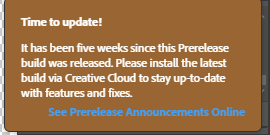
PS界面右上角出现的“Time to Update”怎么关闭?---转载
1. Close Photoshop if open
2. Navigate to "C:\Program Files\Adobe\Adobe Photoshop 2023\Required\UXP\com.adobe.photoshop.inAppMessaging\js"
3. Locate the javaScript File "0.js"
4. Open the 0.js file in a text editor (Notepad, Notepad++, etc)
5. Search for 996633 in the file. You may see two entries. Locate the first instance.
6. Input ",display:none" (including the comma) right after "996633" (after the quotation marks no spaces)
7. Save the file
注:紧接着引号没有空格,然后输入",display:none" 有个逗号
注:win和mac都适用